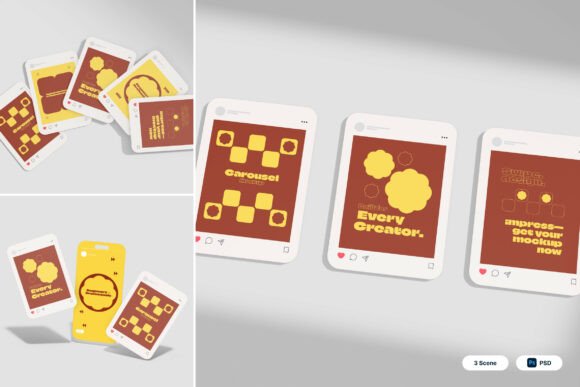
IG Carousel 3D Mockup: Streamlining Instagram Visuals for Creative and Business Use
For digital creators, marketers, and business owners, presenting content effectively on Instagram is more than just aesthetics—it's a strategic component of brand identity and audience engagement. The IG Carousel 3D Mockup offers a streamlined solution for visualizing multi-image posts before publishing. This tool simplifies the design process by allowing users to preview their Instagram carousel posts in a dynamic, interactive format that mimics real-world user interaction.
At its core, the IG Carousel 3D Mockup is a set of Photoshop files that enable users to insert their own content into pre-designed 3D scenes. These scenes simulate floating social media post cards and interactive feed presentations, giving a realistic preview of how a carousel post will appear to followers. With three included PSD files and a user-friendly smart object layer system, the mockup is both versatile and easy to implement across a variety of branding and marketing workflows.
Using the IG Carousel 3D Mockup in Different Stages of Content Creation
The IG Carousel 3D Mockup fits naturally into multiple stages of the content creation lifecycle. During the planning phase, it serves as a visualization tool that helps creators and teams align on the look and feel of an upcoming Instagram campaign. By inserting placeholder designs into the mockup early, stakeholders can get a sense of how the final carousel will appear without needing to publish test posts.
In the execution phase, the mockup becomes a quality control checkpoint. Designers can use it to ensure that each image in the carousel maintains a consistent visual tone and message. This is especially valuable for influencer marketing or startup advertising, where brand alignment and visual polish are crucial for audience trust and engagement.
After a post goes live, the IG Carousel 3D Mockup can still be useful. Marketing teams often repurpose carousel posts into case studies, portfolio pieces, or campaign reports. The mockup allows them to showcase the post in a professional format that can be included in client decks or internal performance reviews.
Integration with Other Tools and Platforms
The IG Carousel 3D Mockup is not a standalone solution—it works best when integrated into a broader digital workflow. For designers, it complements tools like Adobe Photoshop and Canva by offering a final-stage preview option. For content creators and marketers, it fits alongside scheduling platforms such as Hootsuite or Buffer, ensuring that the visual assets align with the overall content calendar.
When used alongside brand asset management systems or design collaboration tools like Figma or Dropbox, the mockup supports consistency across team members and departments. This compatibility helps maintain a unified brand voice, especially when multiple contributors are involved in content creation.
For entrepreneurs and small business owners, the mockup integrates easily into DIY marketing strategies. Whether you're designing your own Instagram posts or outsourcing to a freelancer, the IG Carousel 3D Mockup provides a clear reference point for how the final product should look. This reduces back-and-forth communication and speeds up the approval process.
Practical Tips for Using the IG Carousel 3D Mockup
Getting the most out of the IG Carousel 3D Mockup involves a few key practices. First, always start with high-quality visuals. The mockup supports high-resolution output (4000 x 3000 pixels at 300 dpi), so using crisp, well-edited images ensures that the final preview looks professional and polished.
Second, take advantage of the smart object layers. Simply double-click the designated layer in Photoshop, insert your design, and save. This non-destructive editing method preserves the original file structure and makes it easy to update visuals without starting from scratch.
Third, organize your files efficiently. Since the package includes three separate PSD files, it’s helpful to label them based on use case—such as campaign mockup, portfolio showcase, or product launch teaser. Keeping a consistent file structure will save time when you need to revisit a project later.
Ensuring Compatibility and Long-Term Use
One of the advantages of the IG Carousel 3D Mockup is its compatibility with modern design software. As long as you have access to Adobe Photoshop, you can open and edit the files without any additional plugins or dependencies. This makes it a reliable tool for long-term use, especially for professionals who need to maintain visual consistency across multiple campaigns or seasons.
It’s also important to note that all image stock used in the mockup is not included. This gives users the flexibility to insert their own branded visuals, but it also means some preparation is required before the mockup can be used. Having a library of approved images or templates on hand will streamline this process.
Workflow Examples for Different Use Cases
Let’s look at a few real-world examples of how different professionals can integrate the IG Carousel 3D Mockup into their workflow:
- Influencer Marketing: An influencer preparing a sponsored carousel post can use the mockup to visualize how each image transitions and how the overall narrative flows. This helps them make adjustments before posting and ensures alignment with the brand’s expectations.
- Startup Advertising: A startup launching a new product can use the mockup to create a teaser campaign. By previewing the carousel layout, they can ensure that each slide builds anticipation and guides the viewer toward a clear call to action.
- Content Creator Portfolio: A freelance graphic designer can showcase their Instagram carousel work using the mockup. This allows potential clients to see the final presentation as if they were scrolling through Instagram, adding a level of realism to the portfolio.
- E-commerce: Online shops can use the mockup to preview product showcases or limited-time offers. Seeing how the images interact in a 3D space helps them optimize the visual hierarchy and ensure product details are clearly visible.
Maximizing Efficiency and Consistency
Efficiency is a key benefit of using the IG Carousel 3D Mockup. Because the smart object layers allow for quick updates, creators can iterate on designs without reworking the entire file. This is especially helpful when running A/B tests or making last-minute adjustments based on feedback.
Consistency is another important factor, particularly for brands that maintain a regular posting schedule. By using the same mockup across multiple campaigns, teams can ensure that their Instagram carousel posts maintain a cohesive look and feel. This visual consistency reinforces brand identity and makes the feed more engaging for followers.
Conclusion: A Valuable Tool for Real-World Implementation
The IG Carousel 3D Mockup is more than just a design asset—it’s a practical tool that supports planning, execution, and review in digital content workflows. Whether you're a solo creator or part of a larger marketing team, integrating this mockup into your process can save time, improve communication, and elevate the quality of your Instagram presence.
By understanding how it fits into different stages of a project and how it interacts with other tools, you can make the most of its features. With thoughtful preparation and consistent use, the IG Carousel 3D Mockup becomes a reliable part of your creative toolkit, helping you present your best work with confidence.