Battery 3D Mockup: A Comprehensive Guide for Packaging and Product Presentation
Understanding the Components of a Battery 3D Mockup
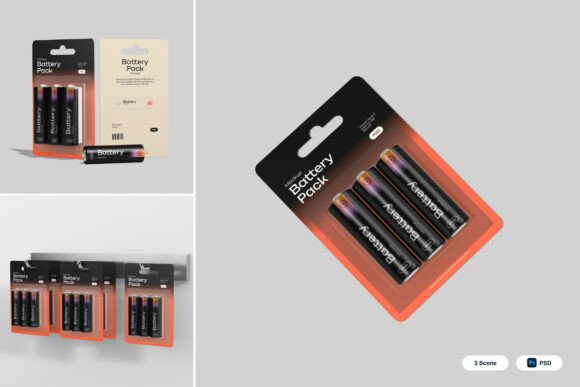
A Battery 3D Mockup is a powerful tool for designers and marketers in the electronics and battery manufacturing industries. It provides a realistic and visually appealing way to showcase products before they hit the shelves or online marketplaces. This type of mockup typically includes a range of design elements such as blister packaging layouts, cylindrical battery displays, and retail-ready scenes. These components work together to offer a comprehensive preview of how the final product will appear in various presentation contexts.
At its core, the Battery 3D Mockup is built using smart object layers within Photoshop. This allows for seamless integration of custom branding and design elements. Users simply double-click a layer, insert their artwork, and save the changes to instantly visualize the updated product. With high-resolution files (4000 x 3000 pixels at 300 dpi), the mockup ensures that every detail is crisp and clear, making it ideal for both print and digital use.
Practical Applications of Battery 3D Mockups
One of the most significant advantages of using a Battery 3D Mockup is its versatility across various use cases. Whether you're designing packaging for a new line of AA batteries or creating promotional visuals for a retail campaign, this tool can adapt to your needs. Here are some of the key applications:
- Electronic Accessories Branding: Manufacturers and retailers can use mockups to present their branded batteries in a professional and market-ready format. This helps in building brand recognition and trust among consumers.
- Battery Packaging Showcases: Designers can experiment with different blister pack layouts and label designs without the need for physical prototypes, saving time and resources.
- Gadget Product Promotions: When launching a new electronic device that uses batteries, having a 3D mockup allows for cohesive marketing materials that include both the gadget and its power source.
- Retail Packaging Concepts: Retailers can visualize how battery products will look on store shelves, helping them make informed decisions about product placement and shelf organization.
- Technology Merchandise Presentations: From trade shows to online catalogs, a well-designed mockup enhances the visual appeal of product presentations, making them more engaging for potential buyers.
Why Designers Prefer Realistic Battery Pack 3D Mockups
Realism plays a crucial role in how consumers perceive product quality. A Battery 3D Mockup that accurately represents the texture, lighting, and packaging details of a real product can significantly influence purchasing decisions. Here's why professionals in the design and marketing fields favor these mockups:
- High Visual Fidelity: The mockup's high-resolution output ensures that even the smallest details like label text, color gradients, and material textures are clearly visible.
- Time Efficiency: Instead of waiting for physical prototypes or photo shoots, designers can quickly generate realistic visuals using the mockup files.
- Cost-Effective: Eliminating the need for physical samples reduces production costs, especially during the early stages of product development.
- Easy Customization: With smart object layers, updating designs is a simple process. This makes it easy to test multiple design variations and iterate quickly.
- Professional Presentation: Using a 3D mockup in presentations or marketing materials conveys a sense of professionalism and preparedness to clients and stakeholders.
Design Considerations When Using a Battery 3D Mockup
While the Battery 3D Mockup offers many benefits, there are several considerations to keep in mind when using it for your projects:
Branding Consistency: Ensure that your logo, color scheme, and typography align with your brand guidelines. This helps maintain a cohesive identity across all marketing materials.
Packaging Layout: Blister packaging is a common choice for battery products due to its durability and visibility. When designing your layout, consider the placement of product information, safety warnings, and recycling symbols.
Lighting and Background: The mockup includes retail-ready scenes, but you may want to adjust the lighting or background to match your brand’s aesthetic or the intended environment where the product will be displayed.
File Management: Since the mockup includes multiple PSD files, it's important to organize your layers and folders properly. This makes it easier to navigate and edit the design later on.
Image Stock: While the mockup provides the 3D models and scenes, the image stock used inside the design is not included. You’ll need to source any additional images or graphics separately to complete your presentation.
Maximizing the Value of Your Battery 3D Mockup
To get the most out of your Battery 3D Mockup, it’s important to approach it as more than just a design tool. Think of it as a strategic asset that can support various stages of your product development and marketing process:
- Early-Stage Design Testing: Use the mockup to test different design concepts before committing to physical production. This allows for rapid iteration and feedback from stakeholders.
- Marketing Material Creation: Generate high-quality images for websites, social media, and printed materials that accurately represent your product’s appearance.
- Client Presentations: Impress clients or investors by showing a polished, realistic version of your product packaging and branding.
- Trade Show Displays: Use the mockup visuals to create digital signage, banners, and booth materials that reflect your product’s retail-ready design.
- E-commerce Optimization: Online retailers can use mockup images to enhance product listings, helping customers visualize the item before purchasing.
Conclusion: A Must-Have Tool for Battery Product Development
In today’s competitive market, the ability to present products in a realistic and professional manner is essential. The Battery 3D Mockup offers a streamlined and effective way to achieve this. Whether you're a designer, marketer, product developer, or business owner, incorporating this tool into your workflow can enhance your branding efforts and improve your time-to-market. With its high-quality visuals, customizable features, and practical applications, it’s clear why this mockup is a valuable asset for anyone involved in the battery and electronics industry.